Meta Ads for B2B isn't broken. Most B2B teams just run it like B2C.
I run Meta Ads for B2B SaaS and lead-gen businesses with one rule: every dollar tied to pipeline, not form fills. No more 200 garbage leads a month. No more "the algorithm is learning" excuses. Just qualified leads your sales team will actually call back.
Meta Ads Health Check
Conversions API connected
Lead quality signals flowing
Manual placements only
Audience Network excluded
Lookalikes from form fills
Should be from closed-won customers
Single creative running 6+ weeks
Creative fatigue likely
Fixing all 4 of these typically recovers 30–50% of wasted spend.
Meta isn't LinkedIn — and that's the point.
✅ Where Meta Ads work for B2B
- • PLG SaaS targeting individuals (designers, devs, marketers, founders)
- • Sub-$500/mo SaaS where decision-makers are also users
- • Lead gen for high-volume, lower-ACV services
- • Retargeting LinkedIn-warm audiences at lower CPMs
- • Top-funnel awareness for new categories
- • B2B brands targeting SMB owners (under 50 employees)
❌ Where Meta Ads struggle for B2B
- • Enterprise SaaS with 6+ stakeholder buying committees
- • Industry-specific tools with niche personas (compliance, vertical SaaS)
- • $50K+ ACV products needing high-touch sales
- • Industries where decision-makers don't browse Meta (heavy industrial, manufacturing C-suite)
- • Low-volume, high-precision ABM plays (use LinkedIn instead)
Bottom line: "If your customer would never personally pay for your product, Meta probably isn't the right top-of-funnel channel. If your customer is also the user — Meta can be your cheapest acquisition channel."
How I run Meta Ads differently.
Conversions API + offline conversion upload
The single biggest fix for B2B Meta accounts. I connect your CRM to Meta via CAPI and upload offline conversions weekly — closed deals, qualified leads, anything downstream of form fill. This teaches Meta what a 'good lead' looks like, not just any lead. Most accounts I audit are missing this entirely. Average impact: 15–30% reduction in cost per qualified lead within 30 days.
Audience hierarchy with exclusion stacks
I rebuild your audience structure from scratch: Cold (Lookalikes built from closed-won customers, not form fills), Warm (Website visitors past 90 days, video viewers 75%+, engaged ICP), Hot (Pricing/demo page visitors, abandoned trials). Excluded everywhere: Existing customers, current pipeline, low-fit job titles, competitors. Most accounts have lookalikes from form-fill audiences (which include all the bad leads). I always rebuild from CRM-pulled customer lists.
Creative testing system
AI-augmented creative production: 15–20 variations per campaign brief, organized into 3 angle types (problem-focused, outcome-focused, social proof). I rotate weekly, kill underperformers at statistical significance, and refresh winners every 4 weeks before fatigue sets in. No more 'we ran the same ad for 3 months and CPA tripled.'
Pipeline-tied weekly reporting
Every Monday, you get a 1-page report: Pipeline $ influenced (not impressions), cost per qualified lead (not CPM), SQL conversion rate by campaign, creative test results + what's launching this week, and one thing I'd change if I could (sales alignment, landing page friction, etc.).
Six fixes most B2B Meta accounts are missing.
Audience Network OFF
Meta's default has Audience Network enabled, pushing ads to junk third-party apps and sites. Traffic quality is consistently low. I turn it off in every account on day one.
Audience Expansion OFF
Another default that 'stretches' your targeting beyond your ICP. Sounds helpful, actually pushes your ad to irrelevant users. Off by default in every B2B account I run.
Conversions API + CRM upload
Connect CRM → Meta via CAPI. Upload closed-won deals weekly so Meta optimizes for actual customers, not form fills. The single highest-impact fix in 80% of B2B accounts I audit.
Pre-qualifying questions in lead forms
Default lead forms prioritize ease over intent. I add 2–3 qualifying questions (company size, role, budget) that filter out tire-kickers. Volume drops 30%, quality jumps 3×.
Manual placements only
I run feed + Reels + Stories explicitly — never 'Advantage+ placements.' Gives me control over where ads serve and what creative format is needed.
Creative refresh on a 4-week cadence
Ad fatigue is the #1 reason CPAs balloon over time. I systematically refresh creative every 4 weeks before frequency hits 4+ and CTR collapses.
From accounts I've audited and optimized.
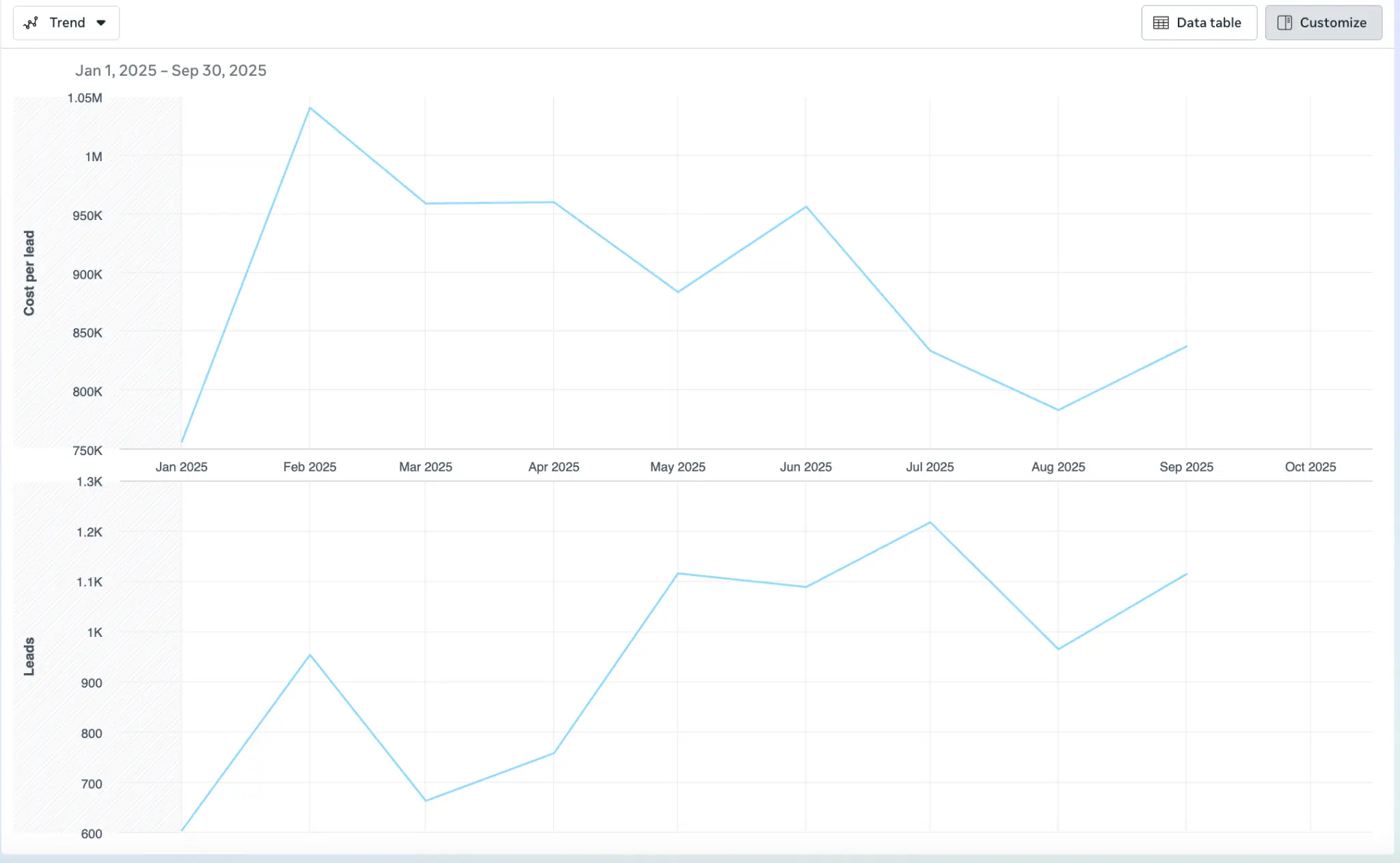
Dashboard shows real performance from live Meta Ads accounts: Cost per lead and Leads generated over 9-month period (Jan 2025 – Sep 2025).
B2B HR-tech SaaS · Meta Ads rebuild
Series A SaaS, $40K/mo Meta spend, sales complaining about lead quality. Here's exactly what I did.
THE PROBLEM
A Series A HR-tech SaaS was spending $40K/month on Meta Lead Ads, generating 380 leads/month at $105 cost per lead. Sales team flagged that 92% of leads either didn't take the demo call or weren't HR decision-makers. They were about to cut Meta from the budget entirely. CMO needed a verdict in 30 days.
THE DIAGNOSIS
I audited the account in 4 hours and found: No Conversions API connected — Meta was optimizing for form fills, not customers. Lookalike audiences built from past form-fill audience (so it kept finding more bad leads). Lead form had 2 fields (email + name) and zero qualifying questions. Creative had been running for 11 weeks with frequency at 6.2. Audience Network and Audience Expansion both ON. Targeting 'HR' job function (broad) instead of specific titles.
THE FIX
Week 1: Connected CAPI, exported 280 closed-won customers from CRM, uploaded as new lookalike seed. Killed Audience Network and Audience Expansion. Week 2: Rebuilt lead form with 3 qualifying questions (company size 50+, role: Director+, current HRIS). Launched 12 new creative variations across 3 angles. Week 3: Restructured campaigns into cold/warm/hot funnel with proper exclusions. Killed underperforming creative at day 7. Week 4: Started weekly creative refresh cadence. Optimized landing page form to match qualifying logic.
THE RESULT
Lead volume dropped from 380/mo to 165/mo (-57%). Cost per lead rose from $105 to $242 (+131%). BUT: Cost per qualified lead dropped from $1,141 (only 9% qualified) to $310 (78% qualified) — a 73% improvement. SQL-to-opportunity rate jumped from 11% to 34%. Sales team stopped complaining; CMO kept Meta in the budget; we doubled spend in month 4. The lesson: Volume metrics like CPL look good on paper but lie about business impact. Optimizing for qualified pipeline cost a higher CPL — and tripled actual revenue. This is why I report on pipeline, not form fills.
"Thomas was the first person who didn't try to sell us 'more leads.' He told us our existing leads were the problem and proved it within 30 days. We were two weeks from killing our Meta budget. Six months later, it's our second-biggest pipeline source."
— [Sample] VP Marketing, Series A B2B SaaS
Anonymized representative client feedback. Replaced with verified testimonials as engagements complete.